Building a Writers Performance Dashboard in Airtable
Engineering · Jun 30, 2026 · 4 min read
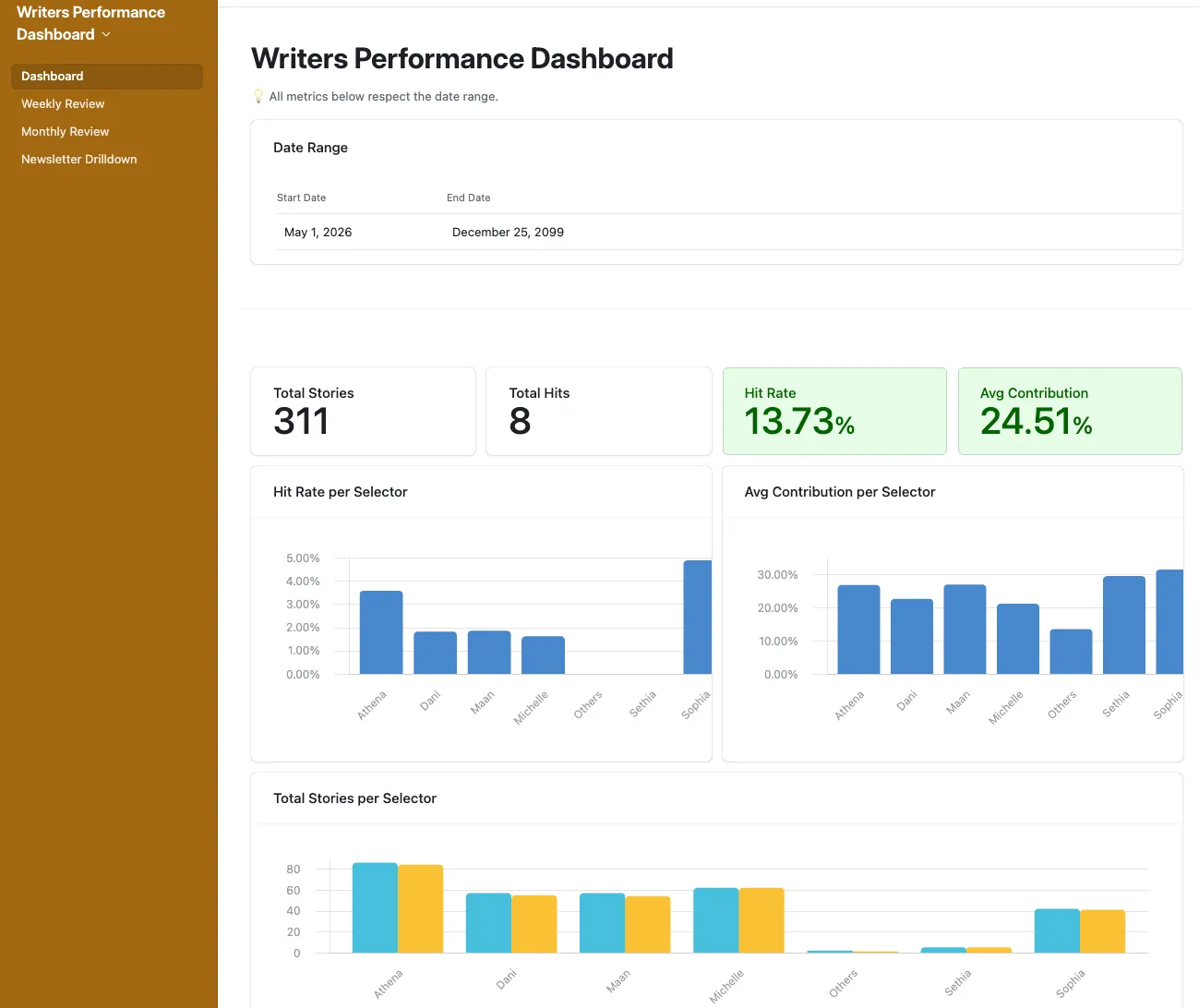
A few weeks ago, an editor I work with asked a simple question: which of our writers needs coaching this month, and which deserve recognition? The team picks stories for a daily newsletter, and "performance" was a vibe — a hunch from eyeballing recent sends. I built a dashboard in Airtable to turn that vibe into a signal. The dashboard was the easy part. Getting the threshold numbers right took longer than the build.
The problem: a vibe, not a signal
The editor was looking at five writers selecting stories for a daily newsletter. Each story has page views from Plausible. "Doing well" meant I think Athena had a good week, which is fine until you need to have a coaching conversation and you're working from a feeling. We needed a signal that survived being written down.
Two metrics, one signal: Hit Rate × Avg Contribution
I landed on two metrics for each writer:
- Hit Rate — the share of their eligible stories that crossed 10,000 page views.
- Avg Contribution — the average percentage of a newsletter's total views their stories pulled.
Either one alone is misleading. A writer can hit often by picking tiny safe stories (high HR, low AC). Another can pull massive share on one viral piece but rarely cross the hit threshold (low HR, high AC). Both together tell a fuller story: how often do they land, and how much do they actually move the needle when they do?
The 5-state Action label
Raw percentages are fine for an engineer. For an editor running a Monday morning, they're noise. The dashboard collapses the two metrics into one labeled state per writer:
⏳ Wait    — Not enough eligible stories to judge yet. Skip.
🟢 Strong  — Both metrics excellent. Recognize.
✅ Steady  — Doing fine. No action.
🟡 Watch   — Mixed signal. Light check-in.
🔴 Coach   — Both metrics weak. Have the conversation.
The label is what shows up in the dashboard. The numbers are still visible underneath for anyone who wants to dig in.
The calibration trap
This is where I almost shipped something useless.
My first cut at thresholds was "Strong = HR ≥ 20% and AC ≥ 18%". I picked those numbers because they sounded like good performance — one in five stories goes viral, nearly a fifth of the newsletter's views. Then I ran the formula against the team's actual all-time data:
| Writer | Hit Rate | Avg Contribution | Action |
|---|---|---|---|
| 1 | 7.36% | 10.10% | 🟡 Watch |
| 2 | 3.70% | 8.12% | 🔴 Coach |
| 3 | 3.08% | 8.35% | 🔴 Coach |
| 4 | 4.29% | 11.08% | 🟡 Watch |
| 5 | 4.88% | 8.67% | 🔴 Coach |
The dashboard's verdict: everyone needs coaching. Which is the same as saying nobody does — there's no signal in "all red."
The math behind the miscalibration is embarrassingly simple. A newsletter has roughly 12 stories. Fair share — the contribution a writer pulls on average if nothing distinguishes them — is 1 / 12 = 8.33%. My 18% threshold was asking writers to pull 2.16× fair share across every single story they wrote. That's not "good performance," that's "consistently viral." On the Hit Rate side, the team's top performer hit 7.36% all-time; my 20% bar was nearly triple that.
I rebuilt the thresholds with one rule: Strong should catch the top one or two writers. Coach should catch maybe one, in a bad month. Most of the team should land in Steady, with Watch picking up real warning signs.
What I shipped:
Strong  — HR ≥ 8%   AND AC ≥ 13%
Steady  — neither metric in the red zone
Watch   — HR < 4%   OR  AC < 7%
Coach   — HR < 3%   AND AC < 5%
Run those against the same team and the distribution becomes useful: nobody Strong yet, three Steady, two Watch, zero Coach. Strong becomes an aspirational label to grow into. Coach is held back for genuinely bad sustained performance, not "below average."
The lesson generalizes beyond newsletters: threshold numbers in any dashboard should be calibrated against the distribution they'll be applied to, not against what feels like a good score. I knew this in principle. I didn't actually do it until the dashboard told me my whole team needed firing.
What I'd do differently next time
Three things I'd change if I built this again:
- Calibrate before launch, not after. Pull the existing data into the formula sandbox before picking any threshold. Five minutes of looking at the actual distribution would have saved an hour of rationalizing 18%.
- Ship the macro view first, the time-windowed views second. I built weekly, monthly, and all-time windows simultaneously. The macro (all-time) view is what the editor actually opens on a Monday. The week and month views are useful, but they're noisier and have to be read more carefully — small sample sizes flip labels easily.
- Plan for re-tuning. Thresholds aren't permanent. As the team grows, hires, or shifts what they cover, the distribution shifts. The dashboard has a 4-6 week re-tune cadence baked in. Anything that calls a person red or green should expect to be questioned.
The dashboard itself is doing its job. The editor has a one-glance view of who to talk to, and the conversation is grounded in numbers both of us can see. But the part of the project I'll remember is the day my own dashboard told me to coach every writer on the team — and how obvious the fix became the moment I stopped defending the number I'd picked.